Before it reaches ANAF, the Romanian tax authority, every SAF-T (D406) return is checked with DUK Integrator, ANAF's official validator. If that check finds even a single error in the XML, DUK does not generate the PDF of the return, and the return cannot be filed. What you get instead is an error file with short, technical messages that are hard to trace back to your accounting data.
We have gathered below the errors that come up most often when validating the SAF-T (D406) return, with an explanation for each one: where it comes from and what you need to do to fix it. The messages follow the examples in ANAF's guide and in error files shared by users, so the wording may vary slightly from one validator version to another. DUK reports them in Romanian, so we quote them as they appear, with a translation.
How to read the DUK error file
The validation result lands in a text file with the same name as the XML, but with the .err.txt extension. Each line tells you in which section and which field of the XML the problem occurred and, very importantly, which record in that section contains the error. Based on that sequence number you quickly identify the record that needs correcting.
After validation you can get two kinds of messages, errors and warnings, and it is very important to tell them apart. An error blocks the PDF, so the return cannot be filed until you fix it. Warnings, on the other hand, come alongside a generated PDF: you can file the return, but it is worth keeping an eye on these messages too, because they usually point to incomplete or unusual data.
The most common D406 validation errors
1A tax code the validator does not recognise
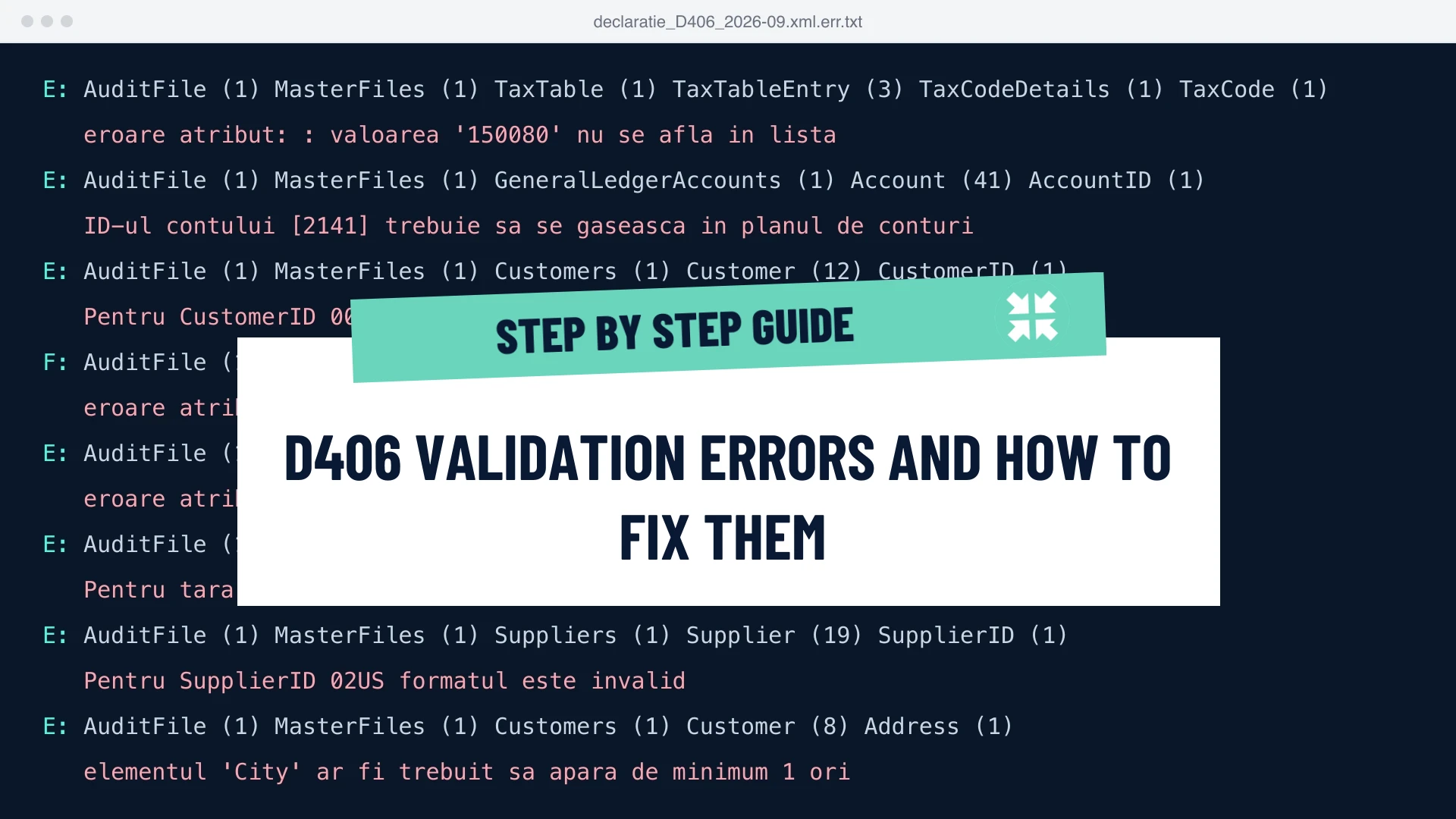
This is probably the most common error, and it is reported like this: valoarea '150080' nu se afla in lista ("the value is not in the list"), usually in the TaxTable or GeneralLedgerEntries sections. The ERP exported a tax code (TaxCode) that the validator cannot find in its nomenclature. Either the mapping of internal codes in the ERP is wrong, or the D406 validator in DUK is older than the codes used in the file. ANAF adds new codes regularly: in February 2026, for example, the validator received the codes for the 16% dividend tax (150080 for dividends paid to companies, 604040 for individuals, 631090 for non-residents) and the codes for the tax on income from the transfer of securities (642050 and 642060). A DUK that has not been updated since then rejects files in which they appear.
The first step is to update DUK Integrator and the D406 validator to the latest version published by ANAF. If the error persists, check the tax code mapping in your ERP against ANAF's SAF-T nomenclature.
2An account that is not in the chart of accounts
The message ID-ul contului [2141] trebuie sa se gaseasca in planul de conturi ("the account ID must be in the chart of accounts") appears because the validator analyses the first digits of every account (AccountID) and expects to find there a synthetic account from the chart of accounts that applies to your entity. An analytic account coded so that its first digits no longer match any existing synthetic account produces exactly this error. So does a wrong chart of accounts type declared in the header (the TaxAccountingBasis field), for example the commercial companies chart for an entity that reports under IFRS or under the NGO chart.
The fix is in the ERP: every analytic account must start from an existing synthetic account, and the chart of accounts type in the header must match the reporting entity.
3A partner ID in the wrong format
Messages such as Pentru CustomerID 00 formatul este invalid or Pentru SupplierID 02US formatul este invalid ("the format is invalid") come from the way SAF-T identifies partners. Every customer and supplier ID starts with a prefix that shows the type of partner, followed by its identification code. If nothing follows the prefix, because the tax ID is missing from the partner record, if there is a space or an extra character, or if the prefix does not match the type of partner, the validator rejects the record.
The correction happens in the partner records in your ERP, following the prefixes in ANAF's instructions: 00 followed by the tax ID (CUI) without "RO" for Romanian partners, 01 followed by the country code and the VAT number for EU partners, 02 followed by the country code and the identification code for non-EU partners, 03 followed by the personal numeric code (CNP) for individuals, and 04 followed by an internal code for individuals who have not declared their CNP. ANAF checks EU VAT numbers in VIES after filing, so it pays to check them in VIES beforehand. We wrote at length about the rules and the automated checks in our article on verifying customer and supplier data in SAF-T.
4A field that is present but empty
atribut prezent dar vid nepermis ("attribute present but empty, not allowed") means the ERP exported a field with nothing in it. It appears frequently with fixed assets that have no inventory number (AssetID) in the annual return, with an empty supplier or tax code, with an empty contact e-mail address, or with an invoice that has no linked accounting entry and is therefore left without an account. The sequence number in the message indicates the record in question; you complete the missing data in the ERP and regenerate the file.
5A mandatory element that is missing
Related to the error above is elementul 'City' ar fi trebuit sa apara de minimum 1 ori ("the element should have appeared at least once"). When an element appears in the XML, such as an address or a bank account, its mandatory fields must be filled in. If they are missing, the validator reports a structure error. The fix lies in the master data of the partner or of the company: full address, IBAN, contact details.
6The wrong form in DUK, or an invalid signature
If you get sectiune necunoscuta ('AuditFile') ("unknown section") or a message about a missing or incorrect namespace in the AuditFile section, most likely a different return type than the file's was selected in DUK, for example D406T for a D406 file or the other way round. Select the right type and validate again. The message Semnatura electronica a fisierului XML ... este eronata ("the electronic signature is wrong") usually has a different cause: the PDF was changed after signing. After any change to the file, generate and sign the PDF again.
7The return type does not match the period
Tipul declaratiei L nu corespunde cu perioada declarata ("return type L does not match the declared period") says that the return type in the header does not match the reporting period. L is monthly reporting, T quarterly, A the annual assets return and C the on-demand stocks return. A related error appears when a date is not in the year-month-day format. Check the period set in the ERP before exporting; for the annual return of companies with a non-calendar financial year, the reported period is the financial year. We have gathered the deadlines for each type of reporting in our article on SAF-T deadlines.
8Wrong currency, country or county codes
SAF-T works with standard codes: RON for the Romanian leu, ISO codes for countries and county codes for the region. That is where messages like valoarea 'LEU' nu se afla in lista or Pentru tara 'RO' codul regiunii RO-- nu face parte din lista ("the region code is not in the list") come from: an internal ERP code instead of the standard one, or an empty county in the partner record. IBANs belong here too, validated against each country's rules. Correct the codes in the ERP's lists or in the export mapping, and fill in the county where it is missing.
9An XML that cannot be read
A fatal parsing error (SAXParseException), for example must end with a '>' delimiter, means the file is no longer well-formed XML. It usually happens after a manual edit that left a tag unclosed, or after an interrupted export. The safest route is to regenerate the file from the ERP. If you have data to correct, correct it at the source or in a tool that regenerates the XML, not directly in the file's text.
Why new errors appear when last month's file was validated
Because ANAF regularly updates the D406 validator and its nomenclatures: tax codes, customs codes (NC8), charts of accounts, withholding tax codes. In February 2026 alone there were two versions, J2.2.17 on 11 February and J2.2.18 on 16 February, which added the codes for the 16% dividend tax, the codes for the tax on income from the transfer of securities and 26 NC8 customs codes. At the time of writing, J2.2.18 is the latest version.
This leads to two common situations: an updated ERP exports new codes that an old DUK does not recognise, or an updated DUK applies new rules that the ERP export does not follow yet. Either way, the first step is to compare your validator version with the one published on the D406 page of ANAF's website.
DUK validation passed. Does that mean the return is correct?
Not necessarily. DUK checks the file structure and the nomenclature values, not the consistency of the accounting data. Only after filing does ANAF run consistency tests, for example whether total debits equal total credits or whether the tax matches the taxable base and the rate, and send notifications when it finds discrepancies.
Since the end of August 2026, you can run some of these tests yourself before filing, with the applications published by ANAF. We described them in our article on ANAF's SAF-T verification tools. And if you have already received a notification, the steps to resolve it are in our guide to resolving ANAF notifications.
How to validate D406 in Latitude App
In the RO SAF-T Check module in Latitude App, DUK validation runs online, with nothing to install. You upload the return's XML, one file or several at once, and the platform runs DUK Integrator, ANAF's official validator. If the file passes, you get the PDF of the return; if not, you get the error file, and for several files an archive with the result of each one. Warnings show up right in the processing log, even when validation passed.
Corrections are no longer made directly in the XML. The return is converted from XML to Excel, where you can easily find the flagged record, correct it and regenerate the XML. The whole team validates on the same DUK version, which we update when ANAF publishes a new one, so you no longer depend on the version installed on each computer. And on the same file you can then run the consistency tests, the reconciliations with D300, D390, D394 and D100, and ANAF's verification applications.
You can try it for free with your own file: create an account and upload the XML of your D406 return.
Frequently asked questions
What does it mean when DUK does not generate the PDF of the return?
That the file has at least one validation error. DUK generates the PDF only for files that pass validation, and without the PDF the return cannot be filed. You will find the errors in the .err.txt file generated next to the XML.
Can I file the return if I only have warnings?
Yes. Warnings do not block the PDF. They are still worth reading, because they usually point to incomplete or unusual data.
How do I know I have the latest D406 validator?
Compare the version in DUK with the one published on the D406 page of ANAF's website. At the time of writing, the latest is J2.2.18, from 16 February 2026.
What if the file is too large?
The signed PDF with the XML attached cannot exceed 500 MB. Above that limit, ANAF allows reporting in modules: you split the return into several files, each with the full header and without breaking a subsection across modules, and you file each module only after you have received the receipt for the previous one.
How do I correct a D406 return already filed?
File the full return again for the same period. The first return filed for a period is the original one, and any return filed later for the same period counts as a corrective return; partial corrections are not accepted. You can find out when fines apply and when they do not in our article on SAF-T fines.
The information is valid as of the publication date, October 2026.
Simplify fiscal compliance with Latitude App
Invoicing, e-Invoice, e-Transport, SAF-T, e-VAT, VAT Statements, VAT Codes Check, Procure-to-Pay (P2P) and XML Reporting — all in one cloud platform. Test for free, no obligations.