XML to Excel Conversion for Reporting
Import from Excel to generate XML or convert XML files into clear, editable spreadsheets in seconds.
starting from €150 /month
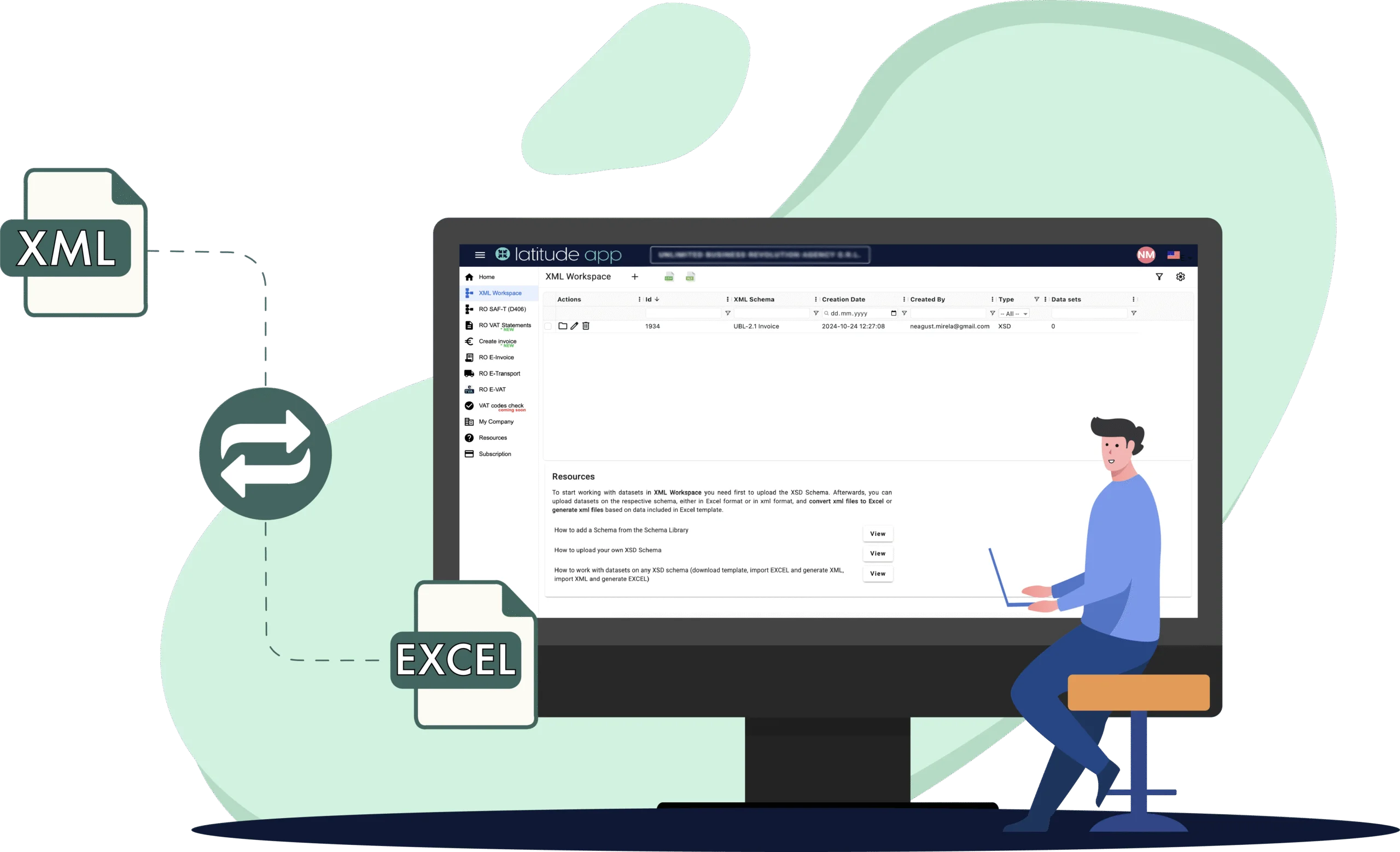
In the digital era, most tax declarations and financial reports are submitted in XML format. XML files are difficult to read and interpret for most users, which is why having a tool that helps you generate and easily view data from XML is essential. Whether you have an XML file exported from your ERP system that you need to verify, or you’re handling SAF‑T, e-Invoicing, e‑VAT, and custom reports, you can rely on XML Reporting to create XML reports, convert to Excel and ensure compliance.
CHOOSE XSD SCHEMA
UPLOAD THE DATA SET
DOWNLOAD THE RESULT
FROM EXCEL TO XML AND BACK, IN SECOUNDS
How XML Reporting works
Choose schema
Pick a predefined schema (SAF‑T, D394, CBC, etc.) or upload your custom XSD to match your reporting needs.
Upload data
Pick a predefined schema (SAF‑T, D394, CBC, etc.) or upload your custom XSD to match your reporting needs.
Convert
Pick a predefined schema (SAF‑T, D394, CBC, etc.) or upload your custom XSD to match your reporting needs.
Download result
Pick a predefined schema (SAF‑T, D394, CBC, etc.) or upload your custom XSD to match your reporting needs.
Proven trust
Latitude App in numbers
Companies across Romania and abroad use the platform daily for invoicing, procurement, tax reporting, and data exchange.
total number of processed data sets
users who tested the XML Reporting
declarations generated in XML format
Key benefits for your team
Clear compliance controls
View all mandatory fields clearly marked and supported by tooltips. Submit reports that match regulatory schemas with full accuracy.
Efficiency & Automation
Accelerate the conversion and generation of XML files. Free up your IT and finance teams for high-value tasks while reducing reporting errors.
Smart, reusable templates
Customize schema structures, hide irrelevant fields, and create reusable templates, ensuring consistency without extra effort.
Simplified data access
Start from an XSD, structure your input in Excel, and convert it into XML seamlessly. Import Excel files with ease and keep all data organized.
Cloud-Based Agility
Access your XML Reporting securely from any location. Work with peace of mind thanks to continuous availability and strong data protection.
Dedicated Tools
A powerful combination — generate error-free structured XMLs and convert them into clear, editable Excel spreadsheets for easy review and reconciliation.
Built with experts for complete accuracy
Our XML Reporting was developed alongside tax and accounting specialists to guarantee legal compliance, providing accurate and secure results.
XML Reporting for SAF‑T Generation
Flexible data input
Use Latitude App's structured Excel templates or integrate your ERP output for seamless SAF‑T file creation.
Custom schema support
Upload your SAF‑T XSD or use preloaded ANAF schemas to match your reporting needs.
Automated structuring
The platform organizes your data according to the SAF‑T schema structure, eliminating manual errors.
Real-time validation
Check your XML file structure instantly and correct issues on the spot before submission.
DUK validation integration
Instantly validate your SAF‑T XML with the embedded DUK integrator, directly in the app.
Cross-check with RO SAF‑T Checks
Compare results and catch issues early with built-in rule-based validation module.
Why professionals trust Latitude App for XML Reporting
Converts XML to Excel and back, fast and easy.
Ideal for SAF‑T, RO e‑Invoice, RO e‑VAT, and more.
Compatible with predefined or custom XSD schemas.
Real-time validation for guaranteed accuracy.
starting from €150 /month
Testimonials
What our clients say
Don't just take our word for it. Hear from companies using XML Reporting every day.
Want a process this simple too?
Try for free
Ionuț Zeche
Managing Partner
Consulting
CLA Romania
Latitude App is one of the most useful applications we have implemented in our organization. It provides a structured environment for managing regulatory reporting requirements and supports our teams in delivering accurate results.

Elena Moise
Financial Manager
Retail
PUMA Sports Romania SRL
Latitude App is an integrated cloud-based platform that automates and streamlines tax reporting processes such as e-Invoice, e-Transport, SAF-T, and e-VAT, enabling efficient data exchange, reducing administrative workload, and ensuring compliance with evolving regulations. It has become an essential tool for our Finance Department, improving efficiency, transparency, and control.

Aura Mladin
Financial Director
Construcții
Hunnebeck Romania SRL
Latitude App offers a practical and intuitive approach to handling complex fiscal reporting obligations. The application supported us during a period when our ERP system was not fully capable of generating the statutory reports required by legislation, and it continues to help us manage multiple reporting obligations efficiently.

Marian Brânzoi
Chief Accountant
Agrobusiness
LAT Nitrogen Romania SRL
Latitude App is an intuitive and easy-to-use solution that supports our reporting activities effectively. The platform helps simplify complex reporting tasks and allows our team to work more efficiently when preparing regulatory files.











Latitude App video tutorials
Learn how to upload, convert, and validate XML and Excel files in just a few easy steps.
This video requires accepting functional cookies.
How to work with XML Schemas in XML Workspace
This video requires accepting functional cookies.
How to work with Data Sets in XML Workspace
This video requires accepting functional cookies.
How to add your own XSD Schema in XML Workspace
Resources & useful articles
Explore all articles to learn more about working with XML and Excel for accurate fiscal reporting.



Explore other Latitude App solutions







Contact
Clear, fast, and error-free XML workflows
From generating compliant XML reports to converting files into Excel, Latitude App's XML Reporting gives you full control at every step. Whether you handle SAF-T, e-Invoice, or custom reports, working with XML becomes simple.
- From Excel to XML and back, in just minutes
- Save time with reusable templates and automation
- Stay compliant with built-in schema validation

Get in touch!
Interested in getting started or testing for free? Leave your contact details here and we will reach out to you shortly!
Message sent!
Thank you for your message! Our team will get back to you shortly.