How to Create an Account in Latitude App
You can easily create your free account in Latitude App.
First access the Latitude App platform: portal.latitude-app.com.
Also, you can use the LOGIN | REGISTER button from the right corner of this site. Then, follow the video tutorial or the instructions below and create your account.
This video requires accepting functional cookies.
Accessing the Platform
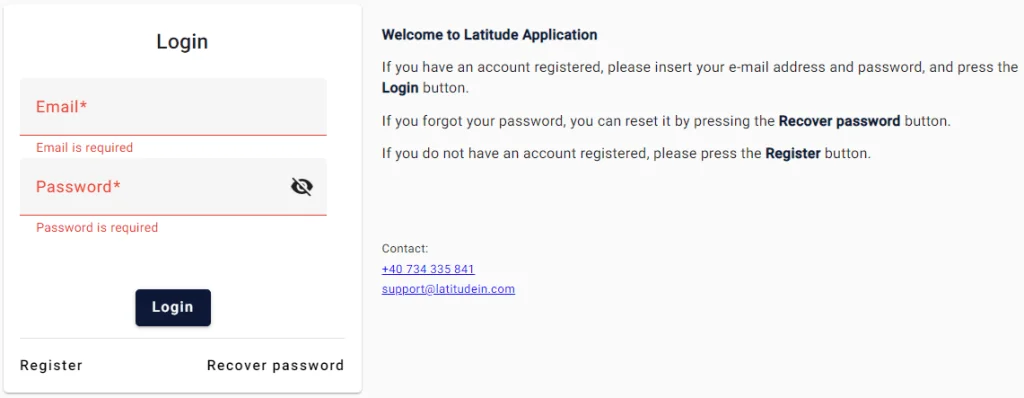
When accessing the platform, you will see the following window:
- If you already have a registered account, please introduce your e-mail address and password and press the Login button.
- If you forgot your password, you could reset it by pressing the Recover password button.
- If you do not have a registered account, please press the Register button.
Creating a New Account
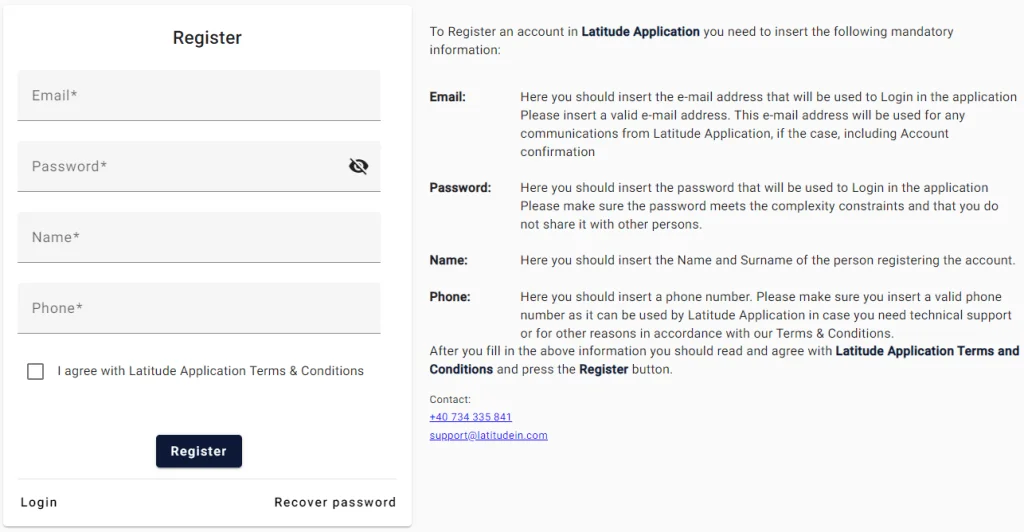
When you press the Register button, you will see the following window.
To register an account with the Latitude App, you must enter the following mandatory information:
- Email: The email address that will be used to login to the app
- Password: The password that will be used to login to the app
- Name: The first and last name of the person registering the account
- Phone: A phone number
After completing the above information, you must read and check that you agree to the Latitude App Terms and Conditions and press the Register button.
Request a Demo
We present the application so you can understand how it works
We answer your specific questions about the application
We evaluate how our application can help your business